Knowledge Management
Branded Instance, Unbranded Articles: Why Doesn't Your ServiceNow Theme Reach Knowledge Content?

You spend a week getting the theme right. Colors, logo, typography, all of it. Then somebody opens a knowledge article and it looks like it came from a different company. This comes up constantly and almost never gets a straight answer, so here's one.
Why Didn't the Theme Reach Our Articles?
Because they're two different layers, and the theme only owns one of them.
ServiceNow's documentation scopes Next Experience theming to lists, forms, and dashboards. A knowledge article body isn't any of those. It's HTML sitting in a field, and when a reader opens the article, that HTML gets rendered inside whatever surface they happen to be in at the time, which might be Employee Center, or an agent workspace, or a search preview.
Your theme styles the container. What's inside the container is whatever the author saved, which in a lot of cases is a paste from Word that brought its own formatting along with it.
So this isn't a setting you missed. There's no switch that connects the two, because they were never the same thing.
Can't We Just Fix It With CSS?
Sort of, and most teams try. There are three versions of this, and they all work until they don't:
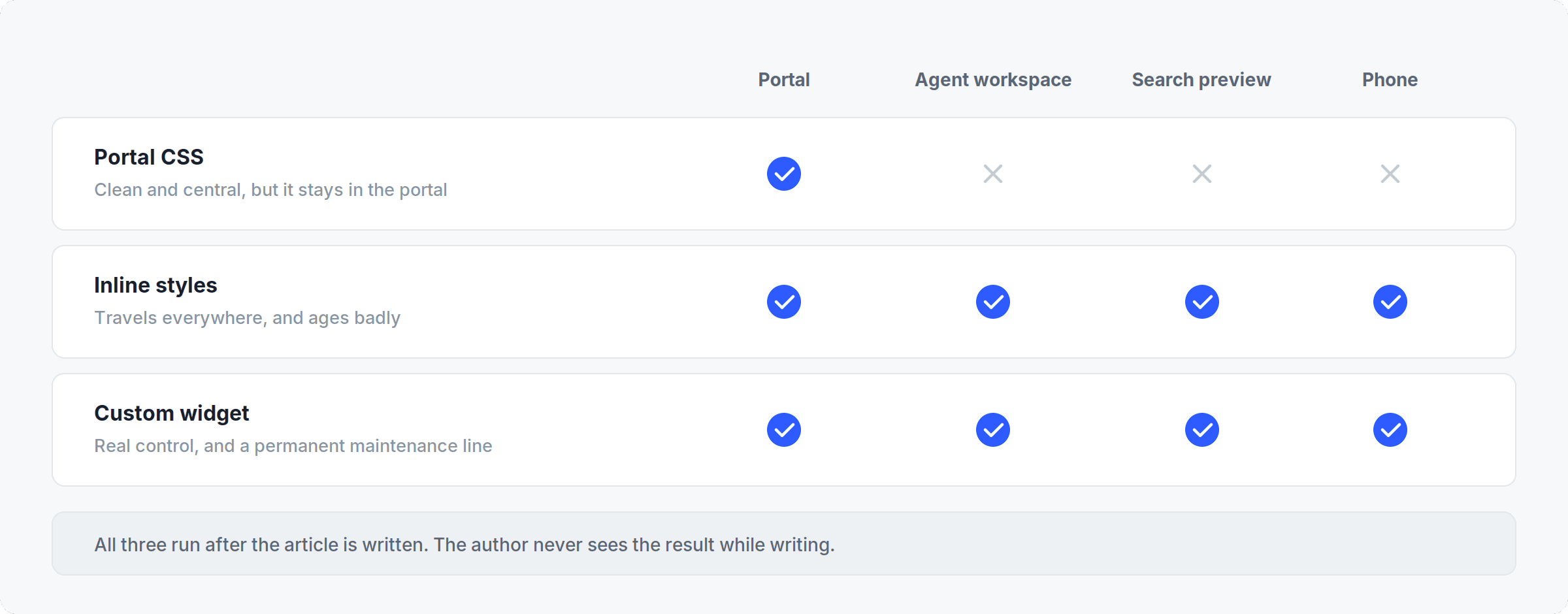
Portal CSS: Clean and central, and it does a good job inside the portal. It doesn't travel with the article. Open the same article in an agent workspace and you're back where you started.
Inline styles: These do travel, which is why people fall back on them, and they're miserable to maintain. Change your brand colors and somebody is opening articles one at a time.
A custom widget: Real control, and also something new to maintain through every upgrade from here on.
The bigger problem with all three is that they do their work after the article is written. The person writing it never sees the result while they're writing, and they have no way of knowing whether it holds together on a phone.
So What Actually Fixes It?
Move the brand controls to where the author is standing, instead of applying them to the page afterward.
That's what Amaze does. It's a scoped application that replaces the authoring surface inside the article itself. An admin sets fonts, colors, and logo once, and every component an author can reach inherits them, so going off-brand stops being an option that exists.
Authors start from one of 60+ templates instead of an empty box, which quietly solves the structural inconsistency at the same time as the visual kind, and those two problems turn out to be more related than they look. Responsive behavior is handled, and there's a device preview, so the phone layout is something you find out about before publishing rather than three weeks later when somebody mentions it in passing.
Theme Builder brands the room and Amaze brands what's in it. You want both. Theme Builder is free, upgrade-safe, and good at the part it covers.
Does Design Still Matter Now That AI Answers the Question?
Yes, but not in one direction, and that's where these arguments usually go wrong.
Structure helps the AI. Clear headings and a real hierarchy make an article far easier to retrieve against and answer from, while a wall of text is hard for anything to work with, human or otherwise.
Visuals help the people. There's a limitation worth knowing about here: the content inside an image doesn't get processed by the LLM. If your explanation is living in a screenshot, it's only reaching the readers who open the article.
So structure and visuals are two separate investments, and they need two separate arguments. If your readers genuinely get everything from Virtual Agent now and never open an article, then visual polish matters less for you and you should spend the money somewhere else. Most organizations aren't there yet. Policies, onboarding material, and anything procedural still get read as pages.
If you want a quick read on where you actually stand, open your five most-viewed articles on your phone. Takes about ten minutes, and it will tell you more than this article will.
Frequently Asked Questions
Does Theme Builder affect knowledge articles at all?
It styles the interface the article is displayed in, not the article body. ServiceNow scopes Next Experience theming to lists, forms, and dashboards.
Why does the same article look different in Employee Center and in an agent workspace?
Same stored HTML, different container. Each surface has its own widths, base fonts, and inherited rules, so anything that depends on context resolves differently.
Can portal CSS fix article styling?
Inside the portal, yes. It does not follow the article into other surfaces, because those surfaces do not load your portal CSS.
Does Amaze replace Theme Builder?
No. They cover different layers and you want both. Theme Builder handles the platform interface, Amaze handles the article body.
What happens to articles built in Amaze if we stop using it?
They stay in the standard ServiceNow knowledge field, so there is no separate content store and no migration to run.
Is this worth fixing if most people get answers from Virtual Agent?
Check before deciding. Structure helps AI retrieval either way, but if nobody opens articles anymore, visual design matters less for you.